A cron job fails quietly. The backup that stopped three weeks ago looks exactly like the one that ran last night, until the day you need it. Instead of reading logs, put the last successful run on your Home Screen, where an old time is hard to miss.
Push a timestamp when the job succeeds
Add one request after the job's real work. It sends the current time as a timestamp metric:
/usr/local/bin/backup.sh &&
curl -fsS -X PUT https://api.widgetdash.app/api/v1/data/backup \
  -H "Authorization: Bearer $WIDGETDASH_WRITE_KEY" \
  -H "Content-Type: application/json" \
  -d '{"display_name": "Home Server", "icon": "server.rack",
       "metrics": [{"label": "Last backup", "value": "'"$(date +%s)"'", "type": "timestamp"}]}'
The && means the push only runs when the backup succeeds. If it fails, the time on the widget stays where it was and keeps getting older.
The widget shows the time as "5m ago", "13h ago" or "2d ago", and keeps counting between pushes, so there is nothing else to update.
Turn it red when it is late
Add a color rule once, in the same request body, and the widget changes color by itself:
"color_rules": {
  "Last backup": [{"older_than": "26h", "color": "red"}, {"color": "green"}]
}
The rules are stored with the source and checked every time the widget reads, so a nightly job shows green after it runs and red when a night is missed. No second job has to watch the first. 26 hours gives a daily job two hours of slack.
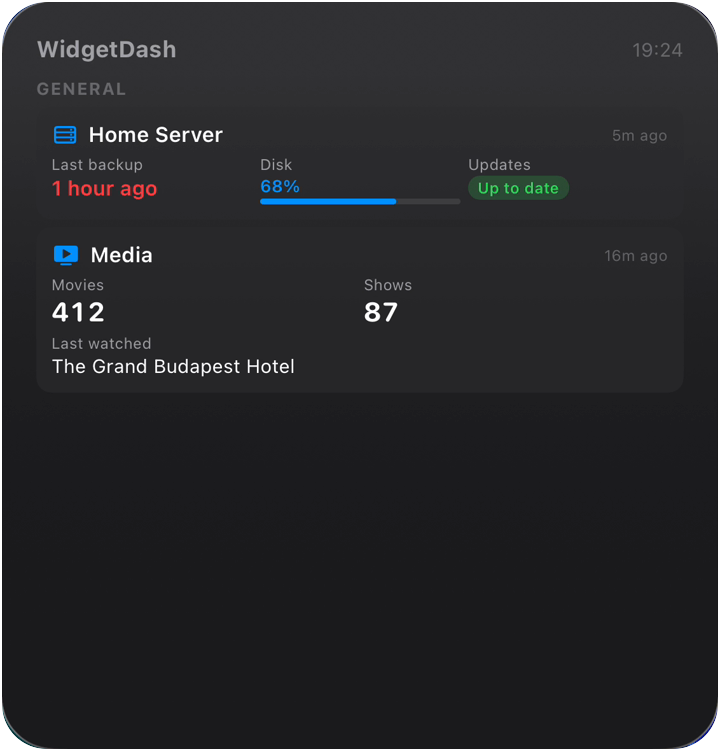
One widget for every job
Give each job its own source_key (backup, db-dump, cert-renewal) and show them together on a Large widget. Most days it is a column of green times; the red one is the job to look at.
For why one number like this works better than a dashboard, see what makes a metric glanceable. To get started, add the widget with the step-by-step guide and copy your write key from widgetdash.app/app.